
Office chairs are sold on adjustment counts. Six points, ten points, fourteen points. More sounds better.
It isn’t, necessarily. A chair with fourteen adjustments whose seat depth range doesn’t suit your legs is worse than a six-adjustment chair that happens to fit you. What matters isn’t how many things move — it’s whether the ranges cover your dimensions, and whether the handful of adjustments that genuinely affect your back are among them.
There are five of those, and most people never touch three of them.
Here’s which adjustments matter, how to set them, and three chairs under $500 that cover different priorities.
The short version
Buy the Steelcase Series 1 (~$449–499) if you want the safest long-term purchase — commercial build and a 12-year warranty at a price where nothing else offers that.
Buy the Branch Ergonomic Chair Pro (~$499) if you want the most adjustability, particularly 5D armrests and two-way lumbar.
Buy the HON Ignition 2.0 (~$399–510) for the longest frame warranty and the widest dealer network, if you catch it at the lower end of its price range.
And before you buy any of them, check that the seat depth and seat height ranges suit your legs. That’s the fit test that decides everything else.
The five adjustments that matter
1. Seat height
The baseline. Your feet should be flat on the floor with your thighs roughly parallel to it, and your knees at about ninety degrees.
Almost every chair adjusts this, so it’s rarely a differentiator — unless you’re very tall or very short, in which case check the stated range. Cylinder ranges vary more than you’d expect, and a chair that won’t go low enough leaves you with dangling feet and pressure under the thighs.
2. Seat depth — the one nobody uses
This is the most underrated adjustment in the category, and many cheaper chairs don’t have it at all.
Seat depth is how far the seat pan extends forward. Correct setting: two to three fingers’ width between the front edge of the seat and the back of your knees, with your back against the backrest.
Too deep and the seat edge presses into the back of your knees, restricting circulation — or you slide forward to avoid it, which means your back loses contact with the lumbar support entirely. Too shallow and your thighs aren’t supported.
If you’re under about 5'4" or over about 6'1", this adjustment moves from useful to essential. Fixed-depth seats are designed around an average that may not be you.
3. Lumbar support — height and depth
Every chair claims lumbar support. The question is whether it’s in the right place for your spine.
The lumbar curve sits at a different height on different people. A fixed lumbar bulge positioned for someone 5'10" lands in the wrong place on someone 5'4", where it either does nothing or actively pushes in the wrong spot.
Height-adjustable lumbar lets you position it at your curve. Depth or firmness adjustment lets you set how much it pushes. Having both is meaningfully better than having one, and far better than having neither.
How to set it: sit back fully, and move the lumbar support until it fills the natural hollow of your lower back without forcing it forward. It should feel like contact, not pressure.
4. Armrests
Armrest adjustability is described in dimensions:
2D — height and width
3D — plus pivot (angling in or out)
4D — plus depth (forward and back)
5D — plus additional movement, usually sliding or rotation
Height is the one that matters most. Your forearms should rest with shoulders relaxed and elbows at roughly ninety degrees. Armrests too high push your shoulders up; too low and you lean to reach them. Either produces neck and shoulder tension over a working day.
Width matters if you’re broad or narrow across the shoulders. Depth matters if you sit close to your desk. Pivot is pleasant and rarely decisive.
One often-overlooked point: armrests that are too tall to fit under your desk force you to sit further back, which ruins your posture regardless of how good the chair is. Check the minimum armrest height against your desk height before buying.
5. Recline tension and lock
Reclining periodically takes load off your lumbar spine, and a chair that won’t recline under your weight is a chair you’ll sit rigidly upright in.
Tension adjustment sets how much force is needed to recline. Weight-activated mechanisms, like Steelcase’s, set this automatically based on your body weight — fewer dials, usually well-judged.
Recline lock holds a position. More stops is better than fewer, and a chair that locks only upright or fully reclined is less useful than one with intermediate positions.
Synchro-tilt means the backrest and seat recline at different rates — typically 2:1 — which keeps your thighs supported as you lean back instead of tipping your knees up.
What doesn’t matter much
Headrests. Useful only if you actually recline and rest your head. For upright desk work, a headrest usually sits behind your head doing nothing, and a badly positioned one pushes your neck forward.
High adjustment counts as a number. Fourteen points is a marketing figure. What matters is which fourteen and whether their ranges fit you.
Mesh versus foam as a quality signal. Mesh breathes better and suits warm rooms; good foam distributes pressure better over long sittings. Both come in good and bad versions.
Gaming-chair styling. Bucket seats with fixed side bolsters are modelled on car seats and restrict how you can shift position. Several are genuinely fine chairs; the shape isn’t doing anything ergonomic.
The three picks
Steelcase Series 1 | Branch Ergonomic Chair Pro | HON Ignition 2.0 | |
Price | ~$449–499 | ~$499 | ~$399–510 |
Weight capacity | 300 lb | 300 lb | 300 lb |
Lumbar | Height-adjustable | 2-way (height + depth) | Adjustable |
Armrests | 4D | 5D | 4D (newer SKU) |
Warranty | 12 years | 7 years | Limited lifetime frame |
Back | Mesh, LiveBack flexor | Mesh | Mesh |
Certification | BIFMA Level 3, GREENGUARD | — | BIFMA X5.1 |
Steelcase Series 1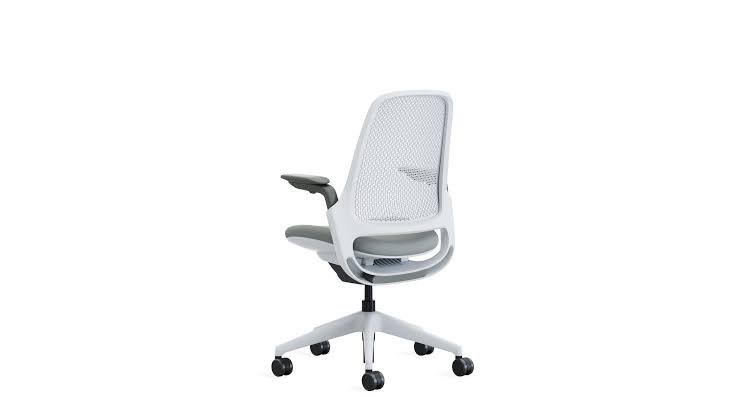
Around $449–499, and the chair that makes the most sense if you intend to keep it.
The reason is the 12-year warranty, which at this price point is unmatched. Steelcase rates it for multi-shift commercial use, which is a meaningfully harder test than home-office duty, and the chair carries BIFMA Level 3 and GREENGUARD certifications.
In use, the standout is the weight-activated recline — it calibrates resistance to your body without you setting a dial, and reviewers consistently describe the tilt as the smoothest in this price band. The LiveBack system flexes with your spine as you change position rather than holding one fixed shape. Lumbar is height-adjustable and the armrests are 4D.
The drawbacks: seat depth adjustment isn’t included on the Series 1 (it appears on the Series 2 above it), which matters if you’re at either end of the height range. And the styling is plainly office furniture rather than home furniture.
Buy it if: you want the chair that will still be fine in a decade, and you’re of broadly average height.
Skip it if: you need seat depth adjustment, or you want something that doesn’t look like it came from a cubicle.
Branch Ergonomic Chair Pro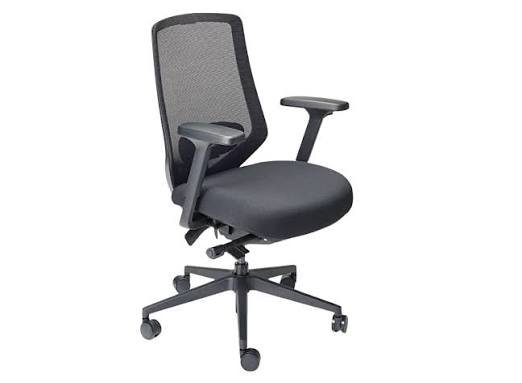
Around $499, launched late 2025, and the consensus mid-range pick across several major review outlets.
It leads on adjustability: 14 points of adjustment, 5D armrests, and two-way lumbar that moves both up and down and in and out. That combination is unusual below $500 and makes it the easiest of the three to dial precisely to your body — which, per the argument above, is the thing that actually matters.
It also looks like home furniture rather than office furniture, which is a legitimate consideration if the chair lives in a visible room.
The drawbacks: the 7-year warranty is good but shorter than Steelcase’s 12, and Branch is a younger company with a less established service path than Steelcase or HON. The sheer number of adjustments also means you need to spend twenty minutes setting it up properly, and most people won’t.
Buy it if: you’re at the taller or shorter end of average, or you’ve had trouble getting previous chairs to fit.
Skip it if: warranty length and long-term serviceability are your priority.
Note: the standard Branch Ergonomic Chair at around $369 is the budget alternative — 3D armrests, fewer adjustment points, same 7-year warranty. It’s the best option under $400 if the Pro’s extra adjustability isn’t what you need.
HON Ignition 2.0 — the warranty play
Pricing on this one has moved around — it’s been seen from about $399 to over $510 depending on retailer and timing, so it’s worth watching.
Its distinguishing feature is a limited lifetime frame warranty (with conditions attached — read them) and BIFMA X5.1 certification, plus HON’s established commercial dealer network, which means repairs and parts are a realistic prospect years from now rather than a hope.
Synchro-tilt, adjustable lumbar, adjustable seat depth, and 4D arms on current SKUs. It’s a straightforward commercial task chair without much styling ambition.
The drawbacks: adjustability is fewer points than the Branch Pro, independent ratings place it a notch below the other two on comfort, and the fluctuating price means it’s only clearly good value at the lower end of its range.
Buy it if: you catch it near $400, you want the longest frame coverage, or you’re buying several for a team.
Skip it if: it’s priced above $500 — at that point the Series 1 is the better chair.
Setting it up properly
Buying the right chair is half of it. Most people never adjust theirs beyond height.
Seat height first. Feet flat, thighs parallel to the floor.
Then seat depth. Two to three fingers between seat edge and the back of your knees.
Then lumbar height. Sit back fully and move it to your natural lower-back hollow.
Then armrests. Shoulders relaxed, elbows at ninety degrees, forearms supported.
Then recline tension. Firm enough to hold you, loose enough that you can lean back without effort.
Finally, your desk. If the desk is too high and isn’t adjustable, raise the chair and use a footrest rather than hunching.
Spend twenty minutes on this once. It does more than the extra $200 of chair.
Mistakes worth avoiding
Buying on adjustment count. Fourteen points means nothing if the ranges don’t cover you.
Ignoring armrest height versus desk height. Arms that won’t fit under the desk push you away from it.
Never adjusting seat depth. The adjustment most people don’t know exists and the one most likely to be causing their discomfort.
Buying a gaming chair for desk work. The bucket shape restricts position changes. Several are decent chairs; the styling isn’t ergonomic.
Treating warranty as fine print. It’s the best available proxy for build quality, and a 12-year commercial warranty tells you what the manufacturer expects the chair to survive.
Expecting a chair to fix back pain. The best chair in the world is worse for you than getting up every 30–45 minutes. A chair reduces the cost of sitting; it doesn’t make sitting good for you.
Frequently asked questions
What’s the most important office chair adjustment?
Seat height and seat depth. Depth is the one most often missing and most often causing problems — the seat edge pressing behind the knees, or the back losing contact with the lumbar support.
Is a more expensive chair worth it?
Up to about $500, yes — build quality and adjustability both improve noticeably. Above that, returns diminish unless you have specific needs.
Mesh or foam?
Mesh breathes better in warm rooms; good foam distributes pressure better over long sittings. Neither is inherently better.
Do I need a headrest?
Only if you recline and rest your head. For upright work it usually does nothing, and a badly positioned one pushes the neck forward.
How long should an office chair last?
Warranty is the guide. Steelcase’s 12-year multi-shift coverage implies a much harder duty expectation than a 2-year home warranty.
Will a good chair fix my back pain?
It can reduce discomfort from sitting, but movement matters more. Get up every 30–45 minutes regardless of the chair. For ongoing pain, see a clinician.
The recommendation
For most people, buy the Steelcase Series 1. At under $500 with a 12-year commercial warranty, weight-activated recline and genuine build quality, it’s the lowest-risk purchase in this price band.
Buy the Branch Ergonomic Chair Pro if you’re at either end of the height range or you’ve struggled to get chairs to fit — the two-way lumbar and 5D arms give you more room to tune it.
Buy the HON Ignition 2.0 if you can get it near $400, or if long-term parts availability matters more to you than comfort rankings.
Then spend twenty minutes setting it up, and get out of it every half hour. Those two things will do more for your back than the difference between any of these three.



Leave a comment