
Ask people who own a standing desk what’s wrong with it, and the answer is almost always the same: it wobbles when it’s up.
Not catastrophically. But enough that a monitor shakes when you type, enough to be distracting, and enough that plenty of people quietly stop raising the desk at all — which makes the whole purchase pointless.
The useful thing is that wobble is predictable from the spec sheet. Three figures tell you most of what you need to know, and none of them is the one manufacturers lead with.
Here’s what they are, plus three desks worth buying.
The short version
FlexiSpot E7 / E7 Pro (~$300–480) — the value answer and the consensus pick. Dual motors, three-stage columns, 355 lb capacity, and a warranty that matches desks costing twice as much.
Uplift V2 (~$450–699) — the premium pick. Same stability class, the widest height range in the category, and by far the biggest accessory ecosystem.
Autonomous SmartDesk Pro (~$399–649) — the design-led option, with the highest maximum height here. The shorter warranty is the trade.
And check three things before anything else: dual motor, three-stage columns, and a weight capacity above 300 lb.
The three specs that determine stability
1. Dual motor, not single
Single-motor desks have one motor driving both legs through a connecting crossbar. Cheaper, slower, noisier, and the transmitted drive introduces play between the legs.
Dual-motor desks have a motor in each leg, synchronised electronically. They lift faster, run quieter, handle more weight, and — because each leg is driven directly — they’re meaningfully more rigid.
Industry testing consistently favours dual-motor designs for both smoothness and stability. At any price above about $300, there’s no good reason to buy single-motor.
2. Three-stage columns, not two
This is the spec that explains wobble better than any other, and it’s rarely mentioned in marketing.
Each desk leg is a set of telescoping tubes. Two-stage columns have two tubes; three-stage have three.
Three stages matter for two reasons. First, more overlap at any given height — the tubes nest further into each other, so there’s less unsupported length and less lever arm for wobble. Second, each tube travels a shorter distance, so the desk lifts faster and reaches both a lower minimum and a higher maximum.
A two-stage desk at full extension is noticeably less rigid than a three-stage desk at the same height. If a listing doesn’t say, it’s usually two-stage.
3. Weight capacity as a proxy for frame quality
You will probably never put 300 lb on a desk. The figure matters anyway, because it’s a reasonable proxy for how substantially the frame is built — steel gauge, joint design, foot size.
Above 300 lb indicates a serious frame. The better desks here quote 355 lb, and some FlexiSpot frames go to 440 lb.
Below about 200 lb indicates a lighter frame that will feel it at standing height, particularly with two monitors and an arm.
And one thing that isn’t the frame: the desktop
A thin or flexible desktop adds perceived wobble regardless of how good the frame is, because the surface itself flexes. A thicker solid top, properly bolted down, stiffens the whole assembly.
If you’re buying a frame separately and pairing it with a cheap top, don’t blame the frame for the result.
Height range is the fit spec
More personal than stability, and the one most likely to leave you with a desk that never quite works.
Measure your elbow height, seated and standing, with your shoulders relaxed and elbows at about ninety degrees. That’s the desk height you need in each position. Add the thickness of the desktop when comparing against a frame’s stated range.
Minimum height matters more than people assume. Standard desks are around 29–30 inches, which is too high for most people under about 5'8" — one of the quiet reasons so many people type with raised shoulders. A desk that drops to 22.8 inches, as the FlexiSpot E7 Pro does, is unusually accommodating.
Maximum height matters if you’re tall. Anyone over about 6'2" should check carefully; a 48-inch maximum will be too low, while 50–52 inches covers almost everyone.
Watch for range quoted without the desktop. Some manufacturers quote the frame range and some the finished desk height. Check which.
The features that decide whether you use it
Stability determines whether you’re happy with the desk. These determine whether you actually raise it.
Memory presets. The single most important usability feature. A desk where you hold a button for fifteen seconds is a desk that stays at one height permanently. Presets mean one tap and it moves. Four presets is standard; two is enough.
Lift speed. Around 1.5 inches per second is good. Slower feels like an interruption, and interruptions stop habits forming.
Noise. Roughly 40–45 dB is quiet enough for an office or a video call. Cheap single-motor desks are considerably louder.
Anti-collision detection. The desk stops if it hits something on the way down — a chair arm, a drawer unit, a bin. If anything lives under your desk, you want this.
Cable management. Underrated. A desk that moves drags its cables, and without a tray and some slack you’ll eventually pull a monitor cable out or trap something. Factor in a cable tray if the desk doesn’t include one.
The three picks
FlexiSpot E7 Pro | Uplift V2 | Autonomous SmartDesk Pro | |
Price | ~$400–480 | ~$450–699 | ~$399–649 |
Motors | Dual | Dual | Dual |
Columns | 3-stage | 3-stage | 3-stage |
Height range | 22.8"–48.4" | 25.3"–50.9" | 26.2"–52" |
Capacity | 355 lb (up to 440 on some frames) | 355 lb | 310 lb |
Lift speed | ~1.5"/sec | ~1.5"/sec | ~1.5"/sec |
Noise | ~45 dB | ~45 dB | — |
Warranty | Up to 15 years | 15 years | 5–7 years |
FlexiSpot E7 / E7 Pro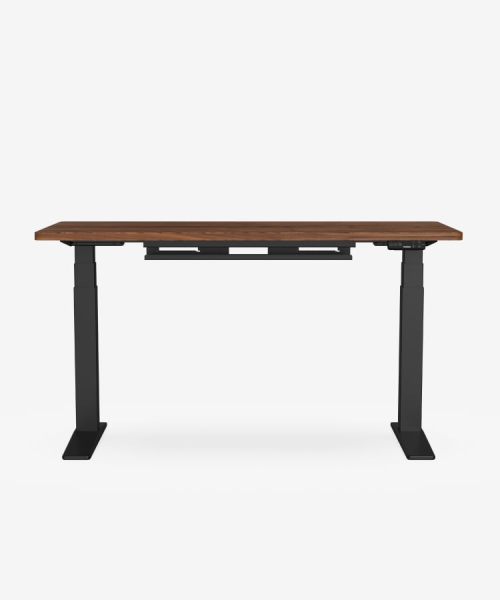
Around $300–400 for the E7 and $400–480 for the E7 Pro, with the standard E7 frequently discounted further.
It’s the desk that keeps winning comparisons, and the reasons are straightforward: dual motors, three-stage columns, 355 lb capacity and a 15-year warranty covering frame and motors. That last point is unusual — many warranties at this price exclude electronics, which is the part most likely to fail.
The 22.8-inch minimum height is the lowest here, which makes it the obvious choice for anyone shorter than average or using a kneeling chair. Lift speed is around 1.5 inches per second at roughly 45 dB, with anti-collision detection. It’s BIFMA certified.
The drawbacks: the maximum height of 48.4 inches is the lowest of the three, so very tall users should look elsewhere. The desktop options are less extensive than Uplift’s, and assembly takes a while.
Buy it if: you want the best stability per dollar, or you’re on the shorter side and need the low minimum.
Skip it if: you’re over about 6'2", or you want extensive customisation.
Note on warranty: coverage varies by region and SKU — some listings quote 5 or 10 years rather than 15. Check the specific product page.
Uplift V2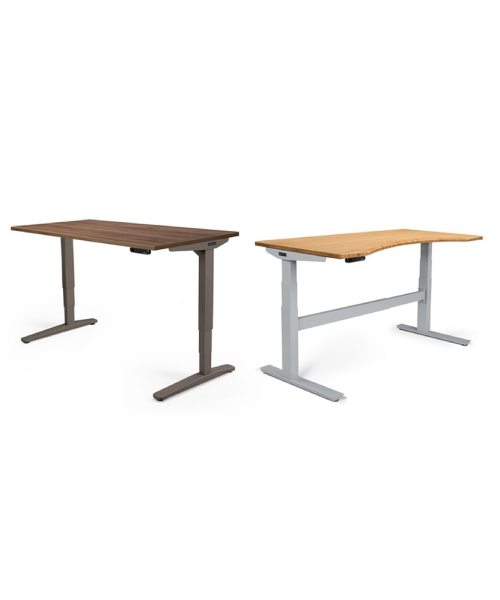
Around $450 on promotion, more typically $599–699 depending on top and configuration.
The frame is in the same class as the FlexiSpot — dual motor, three-stage, 355 lb, 15-year warranty on frame and motors. What you’re paying for is range and ecosystem.
The height range of roughly 25.3 to 50.9 inches is the widest commonly available, and the Commercial frame extends further still. Uplift’s accessory catalogue is the largest in the category: monitor arms, cable trays, keyboard trays, wire management, hooks, a huge range of desktop materials and sizes. If you want to build out a complete setup from one supplier, this is the one that lets you.
Stability at full height is consistently rated at the top of the category.
The drawbacks: price, which rises quickly once you start adding options. And the base frame doesn’t go as low as the FlexiSpot, which matters for shorter users.
Buy it if: you want a 10-year daily driver, you’re tall, or you want the accessory ecosystem.
Skip it if: you just want a stable desk — the FlexiSpot delivers that for less.
Autonomous SmartDesk Pro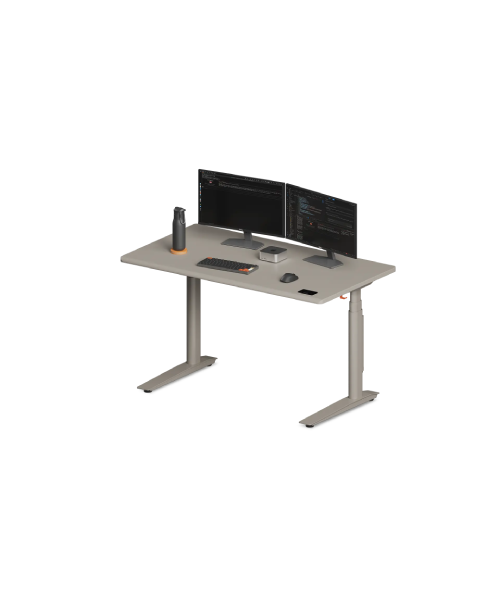
Around $399 to $649 depending on size and top.
The cleanest-looking desk of the three, with a slim keypad and a good range of desktop finishes — it suits a visible home office better than the more utilitarian alternatives. Dual motors, three-stage columns, and the highest maximum height here at 52 inches, which makes it the pick for very tall users.
Cable management is well thought through, which is a genuine differentiator in a category that mostly ignores it.
The drawbacks: 310 lb capacity is the lowest of the three, which puts it a notch down on frame substance. And the warranty is 5 to 7 years against the others’ 15 — on a product where motors and controllers are the likely failure point, that’s a meaningful gap. Earlier models had motor reliability complaints; the 2026 revision reportedly addressed these, but the warranty still trails.
Buy it if: appearance matters, or you’re tall enough to need the 52-inch maximum.
Skip it if: long-term warranty coverage is a priority.
What a standing desk actually does for you
Worth being straight about: the health claims attached to standing desks are overstated. Standing all day isn’t better than sitting all day — it brings its own problems, including leg and lower back fatigue and venous discomfort.
The benefit is changing position. Alternating between sitting and standing through the day, rather than holding either posture for hours, is what the ergonomics case actually rests on.
A reasonable pattern is 30 to 45 minutes seated, then 15 to 20 standing, repeated. Start with less standing than you think — most people overdo it in the first week, get sore, and stop.
An anti-fatigue mat makes a bigger difference to how long you can stand comfortably than almost anything about the desk itself, and costs a fraction as much.
Mistakes worth avoiding
Buying single-motor to save money. Slower, louder, less stable. The upgrade is worth it.
Not checking column stages. Two-stage desks wobble noticeably more at standing height. If the listing doesn’t say, assume two.
Ignoring minimum height. If you’re under 5'8", many desks don’t go low enough for correct seated posture.
Pairing a good frame with a flimsy top. The desktop flexes and you’ll blame the frame.
Skipping memory presets. A desk that’s awkward to adjust is a desk that stops moving.
Forgetting cable slack. Moving desks pull cables. Plan a tray and extra length before you set up.
Standing all day at first. Build up. Most people overdo it and give up.
Frequently asked questions
Why does my standing desk wobble?
Usually two-stage columns, a single motor, a light frame, or a flexible desktop. Three-stage dual-motor frames with high weight capacity are substantially more rigid.
Is a dual-motor desk worth the extra cost?
Yes. Faster, quieter, higher capacity and more stable. Industry testing consistently favours it.
What height range do I need?
Measure elbow height seated and standing with shoulders relaxed. Under 5'8", check the minimum carefully; over 6'2", check the maximum.
How much weight capacity do I need?
You won’t use 355 lb, but the figure indicates frame substance. Above 300 lb is the marker for a serious frame.
Are standing desks actually good for you?
The benefit comes from alternating positions, not from standing constantly. Standing all day brings its own problems.
How long should I stand for?
Build up gradually. Something like 15–20 minutes standing per 30–45 minutes sitting is a common starting pattern.
Do I need an anti-fatigue mat?
If you’ll stand for more than short stretches, yes. It makes more difference to comfort than most desk features.
The recommendation
Buy the FlexiSpot E7 or E7 Pro. Dual motor, three-stage columns, 355 lb capacity and a long warranty covering the motors — at a price well below desks offering the same. It’s the right answer for most people and the low minimum height makes it unusually accommodating.
Buy the Uplift V2 if you’re tall, you want the accessory ecosystem, or you want the widest height range available.
Buy the Autonomous SmartDesk Pro if the desk is in a visible room and appearance matters — but go in knowing the warranty is shorter.
Then add a cable tray and an anti-fatigue mat, set two memory presets, and alternate rather than committing to standing all day.

Leave a comment