
Before comparing features, go and look behind your current thermostat.
Most smart thermostats need a C-wire — a “common” wire that supplies continuous 24-volt power. Older thermostats didn’t need one, because they didn’t need power to run a display and a Wi-Fi radio. Plenty of homes, particularly older ones, simply don’t have one in the wall.
This single fact eliminates more purchases than any feature comparison. It’s also solvable, and how each manufacturer solves it is a genuine differentiator:
Google Nest runs partly on an internal battery and works without a C-wire in the large majority of homes
Ecobee includes a Power Extender Kit in the box, which creates the equivalent of a C-wire at your furnace
Honeywell T9 officially requires a C-wire, though adapters are available and some bundles include one
Third-party “add-a-wire” kits run roughly $25–40 if you need one
Check first. Then read the rest of this.
The short version
Ecobee Smart Thermostat Premium (~$150–250) — the most complete system. Air quality monitoring, occupancy sensing, a sensor included, support for up to 32 more, and the Power Extender Kit that solves C-wire problems.
Google Nest Learning Thermostat 4th Gen (~$230–280) — the best automatic learning and the nicest object. Works without a C-wire in nearly all homes.
Honeywell Home T9 (~$199–205) — the best multi-room sensing, with sensors that read temperature, humidity and motion across a 200-foot range.
And treat the savings percentages as modelling, not measurement. How much you save depends almost entirely on what you do now.
Remote sensors matter more than learning
The headline feature in this category is intelligence — learning algorithms, adaptive scheduling, AI. The feature that actually changes how your house feels is duller: sensors in other rooms.
A thermostat measures temperature at exactly one point, usually a hallway wall chosen by whoever built the house. If your bedroom runs cold and your living room runs hot, the thermostat doesn’t know and can’t act on it. It heats until the hallway is comfortable, then stops.
Remote sensors fix this. They report temperature from the rooms you actually occupy, and the thermostat can average across them or prioritise specific rooms at specific times — the bedroom overnight, the office during the day.
The occupancy element is the second half. Sensors that detect motion let the system weight toward rooms that have people in them and ignore empty ones. That’s a comfort improvement and an efficiency one at the same time.
Sensors included | Max sensors | Detects | |
Ecobee Premium | 1 | Up to 32 | Temperature, occupancy |
Nest Learning 4th Gen | 1 | Multiple | Temperature |
Honeywell T9 | 1 | Up to 20 | Temperature, humidity, motion |
If your house has an uneven temperature problem — and most do — sensors will do more for you than any learning algorithm. Budget for one or two extra beyond what’s in the box.
The savings numbers are modelled
Manufacturers quote impressive figures: up to 26% on heating and cooling, up to 31%, around $284 a year.
These come from manufacturer modelling under assumed conditions, not from measurement in your house. They’re not fabricated, but they describe a scenario, and whether it’s your scenario depends on one thing.
How much you save depends on what you do now:
If you currently leave the thermostat at one temperature 24 hours a day, the savings are real and can be substantial. Setting back while you’re out and asleep is where essentially all of the benefit comes from.
If you already set back manually — turning the heating down when you leave and overnight — a smart thermostat will save you very little. You’re already capturing the saving; the thermostat just does it without you thinking about it.
Geofencing and occupancy detection add some value on top by catching irregular schedules, but the core mechanism is setback, which a $30 programmable thermostat also does.
The honest version: buy a smart thermostat for convenience, remote control and comfort. Treat energy savings as a bonus whose size you can estimate from your current habits.
Learning or scheduling
Two philosophies, and the right one depends on your life.
Nest learns. You adjust it for the first couple of weeks and it builds a schedule from your behaviour. Good if your routine is irregular or you can’t be bothered to program anything. Frustrating if you want precise control, because you’re negotiating with it rather than instructing it.
Ecobee schedules, plus occupancy. You set a schedule, and sensors adjust around it based on where people actually are. More deterministic, more configurable, and more setup.
Honeywell schedules, with multi-room prioritisation layered on.
If you like knowing exactly what your heating will do, avoid learning thermostats. If you want to install it and forget it, Nest is the one.
Check HVAC compatibility before anything
Smart thermostats work with low-voltage 24V systems, which covers most central heating and air conditioning in the US.
They do not work with line-voltage systems — electric baseboard and in-wall heaters running at 120V or 240V. Those need a dedicated line-voltage smart thermostat; Mysa is the best-known.
Also check specifically if you have:
A heat pump, especially with auxiliary or emergency heat
A dual-fuel system (heat pump plus furnace)
Multi-stage heating or cooling
Zoned systems with multiple thermostats
Every manufacturer publishes an online compatibility checker that walks you through the wires behind your current unit. Use it. It takes five minutes and it’s the difference between a smooth installation and a return.
The three picks
Ecobee Premium | Nest Learning 4th Gen | Honeywell Home T9 | |
Price | ~$150–250 | ~$230–280 | ~$199–205 |
C-wire | Not required (PEK included) | Not required in most homes | Required (adapter available) |
Sensors | 1 incl., up to 32 | 1 incl. | 1 incl., 200 ft range |
Sensor detects | Temp, occupancy | Temp | Temp, humidity, motion |
Air quality | Yes | No | No |
Voice built in | Alexa + Siri | No | No |
HomeKit | Yes | No | Yes |
Matter | Yes | Yes | Varies |
Warranty | 3 years | Varies | 2 years |
Ecobee Smart Thermostat Premium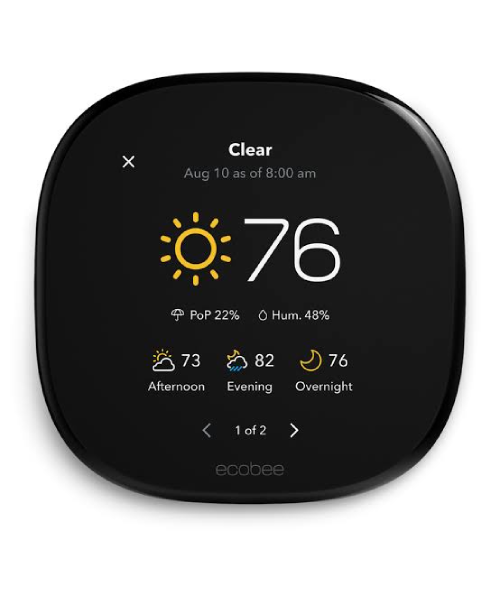
List price around $249, with street prices seen as low as the $150s.
It does the most of the three. One SmartSensor is included and it supports up to 32, which is more than any house needs and means you can cover every room that matters. The sensors detect occupancy as well as temperature, so the system weights toward rooms with people in them.
It has a built-in air quality monitor, a built-in speaker with both Alexa and Siri available, and it listens for smoke and CO alarm sounds and can alert you. It works with Alexa, Google Assistant, Apple HomeKit, SmartThings and Matter — the broadest ecosystem support here, and the only one of the three with native HomeKit.
Crucially, the Power Extender Kit is in the box, which resolves the C-wire problem at the furnace end for most systems. And the warranty is three years, the longest of the three.
The drawbacks: the air quality sensor is indicative rather than lab-grade, and shouldn’t be relied on for anything serious. It’s the most feature-dense and therefore the most setup. And at full list price it’s the most expensive — though it discounts heavily.
Buy it if: you want multi-room sensing, you’re in the Apple ecosystem, or you want the most capable system.
Skip it if: you want something simple that sets itself up.
Google Nest Learning Thermostat 4th Gen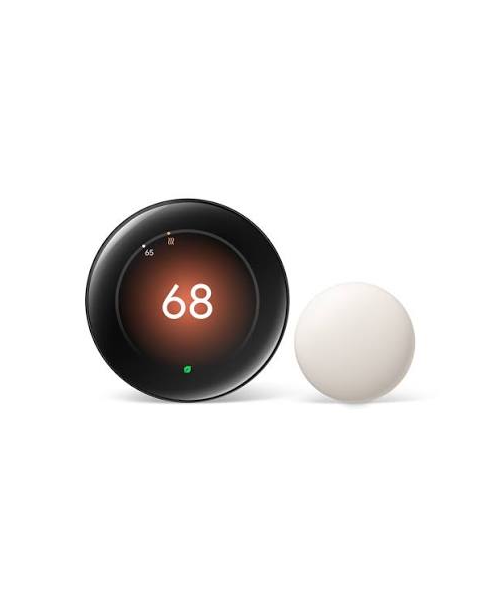
Around $230 to $280.
The best auto-learning implementation available. It watches what you do for a couple of weeks and builds a schedule, then adjusts with occupancy and geofencing. For people who won’t program a thermostat, this is the one that still saves them money.
It’s also the best-looking, with a machined metal body and a Farsight display that lights up as you walk toward it. The 4th generation adds Soli radar sensing alongside temperature. It’s Matter compatible and works without a C-wire in the large majority of homes.
The drawbacks: no HomeKit support, which rules it out for Apple households. It’s the most expensive of the three at list. Remote sensor support is less extensive than Ecobee’s, and the sensors detect temperature only. And if you want deterministic control rather than negotiation, learning can be irritating.
Buy it if: you want it to sort itself out, you’re in the Google ecosystem, and the design matters.
Skip it if: you use HomeKit, or you want granular multi-room control.
Honeywell Home T9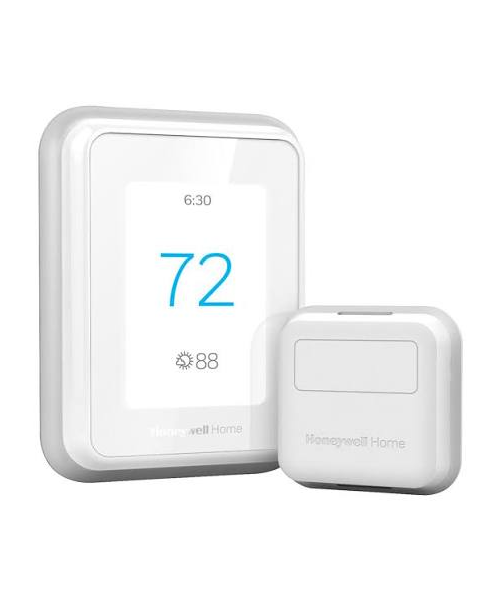
Around $199 to $205.
Its sensors are the most capable here: the Smart Room Sensors detect temperature, humidity and motion, operate over a proprietary 900 MHz link with a 200-foot range, and support up to 20 across a property. For large houses or awkward layouts where Wi-Fi sensors struggle, the range advantage is real.
The multi-room focus feature lets you prioritise specific rooms at specific times, and the humidity sensing adds something neither competitor offers. It works with Alexa, Google Assistant and HomeKit, and it’s Energy Star certified.
The drawbacks: it officially requires a C-wire, which is the biggest installation hurdle of the three — adapters exist and some bundles include one, but it’s an extra step. The interface and app are less polished than Ecobee’s or Nest’s. And the warranty is two years, the shortest here.
Buy it if: you have a large or awkwardly laid-out house, you have a C-wire, or humidity matters to you.
Skip it if: you don’t have a C-wire and don’t want to deal with an adapter.
One budget option worth knowing: the Amazon Smart Thermostat at around $80 uses Honeywell technology, includes a C-wire adapter, and covers the basics. No remote sensors, Alexa only. If you want scheduling and remote control without the rest, it’s the cheapest sensible entry.
Mistakes worth avoiding
Not checking for a C-wire first. The most common reason a smart thermostat gets returned.
Not using the compatibility checker. Heat pumps, dual-fuel and multi-stage systems need confirming before purchase.
Buying a 24V thermostat for electric baseboard heating. Line-voltage systems need a different product entirely.
Expecting the advertised savings. The figures assume you currently don’t set back. If you already do, your saving is much smaller.
Skipping remote sensors. They do more for comfort than any algorithm, and most people buy the thermostat and never add one.
Buying Nest if you use HomeKit. It doesn’t support it.
Mounting a sensor in direct sunlight or above a radiator. It’ll report a temperature nobody is experiencing.
Frequently asked questions
What is a C-wire and do I need one?
It’s a common wire supplying continuous 24V power. Most smart thermostats need it. Nest works without one in most homes; Ecobee includes a Power Extender Kit; Honeywell’s T9 requires one or an adapter.
Do smart thermostats really save money?
They save money if you currently leave the heating at one temperature all day. If you already turn it down when out and overnight, the saving is small — you’re already capturing it.
Are remote sensors worth it?
Yes, and more than the learning features. A thermostat only measures one spot. Sensors let it respond to the rooms you’re actually in.
Which works with Apple HomeKit?
Ecobee and Honeywell T9. Nest does not.
Will it work with my heat pump?
Usually, but check — heat pumps with auxiliary heat and dual-fuel systems have specific requirements. Use the manufacturer’s compatibility checker.
Can I install it myself?
If you have a C-wire and a standard 24V system, generally yes — it’s a wire-for-wire swap with photos of the old wiring. If you’re adding a Power Extender Kit at the furnace, or you have a complex system, consider a professional.
What about electric baseboard heating?
Standard smart thermostats won’t work. You need a line-voltage model such as Mysa.
The recommendation
Check behind your existing thermostat for a C-wire, then run your system through the manufacturer’s compatibility checker. Those two steps decide most of this.
For most households, buy the Ecobee Smart Thermostat Premium. It handles the C-wire problem in the box, has the best sensor ecosystem, supports every major platform including HomeKit, and carries the longest warranty — and it discounts frequently.
Buy the Nest Learning Thermostat 4th Gen if you want it to configure itself and you’re not on HomeKit.
Buy the Honeywell T9 if you have a large house where sensor range matters and you already have a C-wire.
Then buy one or two extra sensors for the rooms you actually use. That’s the part that changes how the house feels — and it’s the part most people skip.


Leave a comment