
Satechi makes docks, hubs, chargers, stands and input devices in machined aluminium finished to match Apple hardware, and that is the whole proposition. Prices run from $29.99 for the Slim EX wireless mouse to $399.99 for the Thunderbolt 5 CubeDock with SSD enclosure, with most of the useful stuff sitting between $44.99 and $129.99. The build quality is genuinely good and the design discipline is unusual in a category dominated by black plastic. You will pay a premium for that, and whether it is worth it depends on where the thing is going to sit.
Buy it if / Skip it if
· Buy it if the accessory will live on your desk where you can see it every day
· Buy it if you own recent Apple hardware and want ports back without a pile of mismatched dongles
· Buy it if you have a Mac Mini, a MacBook Neo, or any machine with fewer ports than you need
· Buy it if you want colour options beyond black and grey — Citrus, Blush and Indigo are genuine choices here
· Buy it if you want NVMe storage built into the dock rather than hanging off it
· Skip it if the accessory lives in a bag and nobody sees it, where cheaper alternatives do the same job
· Skip it if you need maximum ports per dollar and do not care how it looks
· Skip it if you are on Windows-only hardware, where the Apple-matched finishes buy you nothing
Who Satechi is
Satechi is a San Diego accessory company built around a single observation: Apple makes beautiful computers and then leaves you to connect them using ugly third-party plastic. The response was to machine accessories from aluminium in finishes that match Apple’s own — Silver, Space Black — and design them to sit alongside the hardware rather than apologise for being near it.
The range now covers docking stations, USB-C hubs and multiport adapters, desktop and travel chargers, wireless charging stands, keyboards and mice, Mac Mini stands with built-in hubs, and a Find My–enabled travel accessory line called FindAll.
The company has also started doing something more interesting than matching Apple’s colours: adding its own. Citrus, Blush and Indigo run across the newer hubs, adapters and mice, which is the first time an accessory brand in this space has treated colour as a design decision rather than an afterthought.
The customer is a Mac or iPhone owner who cares what their desk looks like, and who has run out of ports.
What Satechi does differently
It designs for the machine, not the port standard. The Mac Mini Stand & Hub sits under the Mac Mini and adds front-facing ports, because the Mini’s own ports are all at the back. The USB-C Snap Hub is built specifically around the MacBook Neo’s two non-identical USB-C ports, routing everything through the high-performance one while the second connector holds it flush — Satechi notes that generic dual-pin hubs fail on this machine for exactly that reason. That is product design, not SKU-filling.
Storage is built into the docks rather than dangling off them. Both the Thunderbolt 5 CubeDock and the Mac Mini Stand & Hub include NVMe SSD enclosures, so your external drive becomes part of the dock rather than another object with another cable. Note that the SSD is not included, and drives with heatsinks or double-sided layouts are not compatible.
The finishes genuinely match. Precision-milled aluminium in Apple’s colour language means a Satechi dock next to a MacBook looks intentional. Nobody else in this category takes that as seriously, and it is the reason people pay more here than they would for an equivalent Anker product.
Colour is now part of the range. Citrus, Blush, Indigo and Silver across the newer adapters, hubs and mice. For a category where everything is black, this is a real differentiator, and it is why these products keep turning up in Macworld’s and TechRadar’s annual picks.
The range, decoded
Product | Price | Best for |
Slim EX Wireless Mouse | $29.99 | A sensible, cheap, good-looking mouse |
OntheGo 5-in-1 Multiport Adapter | $44.99 | Travel — one port becomes five |
USB-C Snap Hub | $44.99 | MacBook Neo owners specifically |
Vegan-Leather FindAll Passport Cover | $59.99 | Travel, with Find My built in |
ChargeView 140W Desktop Charger | $99.99 | One charger replacing four adapters |
Mac Mini Stand & Hub with SSD Enclosure | $99.99 | Mac Mini owners — the obvious upgrade |
3-in-1 Foldable Qi2 25W Charging Stand | $129.99 | Bedside and travel charging for three devices |
Thunderbolt 5 CubeDock with SSD Enclosure | $399.99 | Full desk setup, 8K displays, serious workflows |
Products worth your money
Mac Mini M6/M5 Pro/M4 Stand & Hub with SSD Enclosure — $99.99
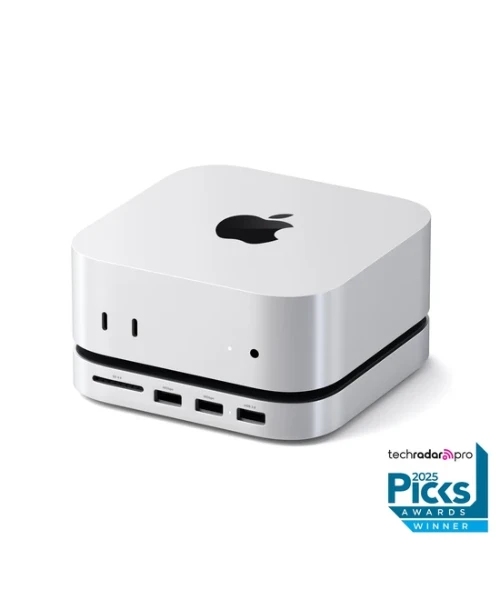
Best for: Anyone who owns a Mac Mini. This is close to a default purchase.
Why it stands out:
· Solves the Mac Mini’s one real design flaw by putting ports on the front, where you can reach them
· Built-in NVMe SSD enclosure, so storage lives inside the stand rather than as another box on the desk
· USB-A ports included for legacy devices, which the Mini itself does not offer
One honest limitation: The SSD is not included, and drives with heatsinks or double-sided layouts will not fit.
Bottom line: The clearest problem-solution fit in the catalogue, and the product most Mac Mini owners end up buying eventually.
ChargeView 140W Desktop Charger — $99.99
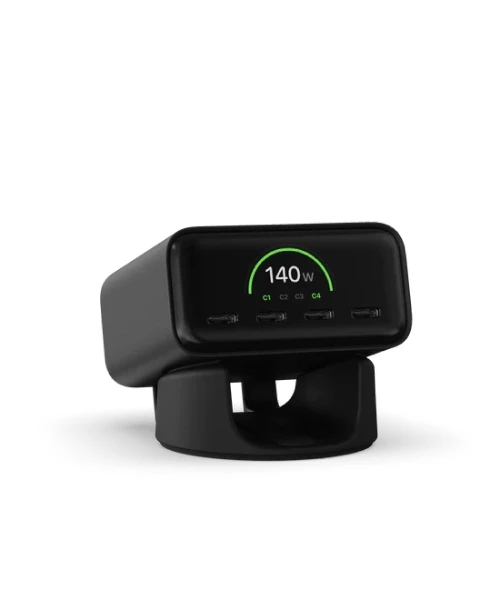
Best for: Replacing the four chargers currently fighting over your power strip.
Why it stands out:
· GaN technology delivering 140W across multiple USB-C devices from one compact unit
· A digital display showing exactly how power is distributed across connected devices — genuinely useful rather than decorative
· Dual-orientation stand and plug options for US, EU, UK, AU and KR
One honest limitation: $99.99 is above what a basic 140W GaN charger costs — you are paying for the display and the desk-first design.
Bottom line: Worth it if it is sitting on your desk; skip it if it is going under a sofa.
OntheGo 5-in-1 Multiport Adapter — $44.99
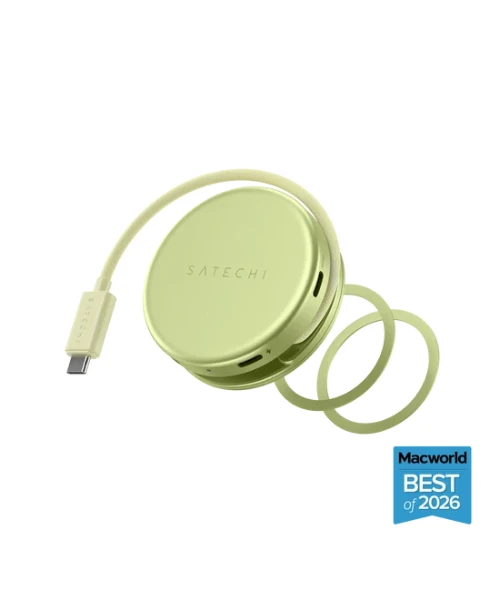
Best for: Travel, and for anyone whose laptop has one usable port.
Why it stands out:
· Turns a single USB-C port into 4K/60Hz HDMI, 60W pass-through charging, USB-A, USB-C data and an SD card reader, all working simultaneously
· A compact puck with an integrated wrap-around cable and magnetic ring, rather than a dongle with a loose tail
· Available in Citrus, Blush, Indigo and Silver, and a Macworld Best of 2026 pick
One honest limitation: 60W pass-through is enough for most laptops but will slow charging on power-hungry machines under load.
Bottom line: The best value in the range, and the one to buy if you are testing whether Satechi is worth the premium.
Thunderbolt 5 CubeDock with SSD Enclosure — $399.99
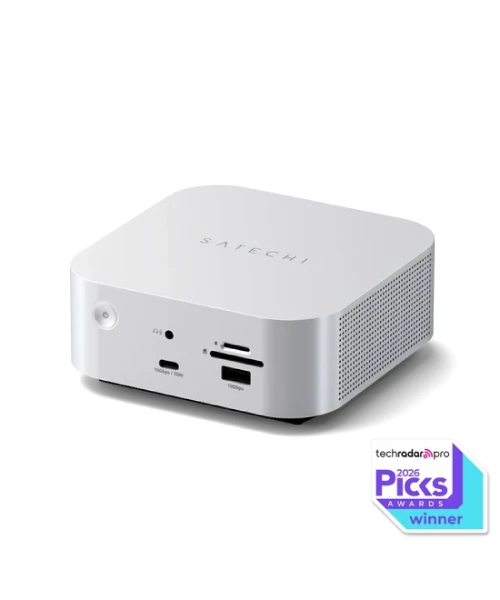
Best for: A permanent desk setup where one cable should do everything.
Why it stands out:
· Drives multi-display setups up to 8K and supplies 140W laptop charging through a single Thunderbolt 5 connection
· Built-in NVMe SSD expansion and active cooling, in a precision-milled aluminium cube that takes up almost no desk space
· A TechRadar Pro 2026 Picks award winner, which is unusual for a design-led accessory brand
One honest limitation: $399.99 is serious money, and Thunderbolt 5 is only worth paying for if your machine and displays can actually use it.
Bottom line: The right buy for a genuine workstation; overkill for a laptop that moves every day.
What owners actually say
Consistently praised:
· Build quality and finish, which is the single most repeated point — these feel like Apple products
· Colour options, particularly on the newer adapters and the Slim EX mouse
· The Mac Mini stand solving a problem owners describe as obvious once fixed
· Thoughtful details like the integrated cable on the OntheGo adapter
Consistently criticised:
· Price against functionally equivalent Anker and Ugreen products
· Aluminium showing scratches and marks over time, particularly in darker finishes
· Heat on higher-powered docks under sustained load
· SSD compatibility restrictions on the enclosure products catching buyers out
The money question
The honest way to assess Satechi is by where the product lives.
If it sits on your desk — a dock, a charger, a stand, a mouse — the premium buys something real. A $99.99 ChargeView with a power display looks and behaves better than a $45 brick, and you will look at it every day for years. The same applies to the Mac Mini stand and the CubeDock.
If it lives in a bag and comes out twice a month, the premium buys you much less. A $44.99 travel adapter is a good product, but a cheaper one in a pocket does the same job and nobody sees either.
The genuine value picks are the Slim EX mouse at $29.99, which is cheap by any standard and better made than most mice at twice the price, and the OntheGo adapter at $44.99. The Mac Mini stand at $99.99 is the best problem-solver. The CubeDock at $399.99 is a considered purchase that only makes sense with the hardware to justify Thunderbolt 5.
Note that the chargers and docks ship in region-specific plug variants, so check you are ordering the right one.
How it compares
Satechi | Anker | Belkin | |
Design priority | Aluminium, Apple-matched finishes, colour range | Function first, plastic typical | Clean but conservative |
Price position | Premium | Value | Premium |
Mac-specific products | Extensive — Mac Mini stands, Neo-specific hubs | Limited | Some |
Thunderbolt 5 | Yes, CubeDock at $399.99 | Yes | Yes |
Who it suits | Mac owners who care how the desk looks | Buyers prioritising ports per dollar | Buyers wanting mainstream retail availability |
Questions people ask
Do the SSD enclosures include a drive?
No. Both the CubeDock and the Mac Mini Stand & Hub take an NVMe SSD you supply, and drives with heatsinks or double-sided layouts are not compatible — check your drive before ordering.
Is the Snap Hub different from a normal USB-C hub?
Yes, meaningfully. It is built around the MacBook Neo’s two non-identical USB-C ports, routing HDMI, data, card readers and charging through the high-performance port while the second connector keeps it flush. Generic dual-pin hubs are not designed for this and reviewers advise Neo owners against them.
Will Satechi work with Windows?
The hubs, docks and chargers are standards-based and work with Windows machines. What you lose is the finish-matching, which is most of why people pay the premium.
Is the ChargeView display actually useful?
It shows real-time power distribution across connected devices, which is genuinely informative if you are charging several things at once and wondering why one is slow. Whether that is worth the price difference is a personal call.
What does Qi2 25W mean on the charging stand?
It is the current wireless charging standard, delivering 25W to a compatible iPhone plus 5W each to AirPods and an Apple Watch on the 3-in-1 stand, which ships with a 45W USB-C adapter included.
Which plug version do I need?
Chargers and docks come in US, EU, UK, AU and KR variants. Select the right one at checkout — the product pages list them as separate options.
The verdict
Satechi worked out something most accessory makers never bothered to think about: that the thing plugged into a beautifully designed computer is also on the desk, also visible, and also part of how the setup feels. Machining accessories from aluminium in Apple’s finishes sounds like a shallow idea until you put a Satechi dock next to a black plastic one and see the difference.
The newer products go further than finish-matching. Building a hub around the MacBook Neo’s specific port architecture, putting the Mac Mini’s missing ports on the front, integrating SSD enclosures into the docks themselves — these are decisions made by people actually using the hardware, not by a product manager filling a price gap.
The caveat is honest and unavoidable: you can buy the same function for less. Anker and Ugreen make hubs and chargers that work, and if ports per dollar is your metric, Satechi loses that comparison every time. The premium is for design and build, and if that does not matter to you, there is no argument here worth making.
Buy the Mac Mini stand if you own a Mini, the OntheGo adapter if you travel, the Slim EX mouse because it is $29.99, and the CubeDock only if your machine and your displays can genuinely use Thunderbolt 5. Skip anything that will spend its life in a bag.


Leave a comment