

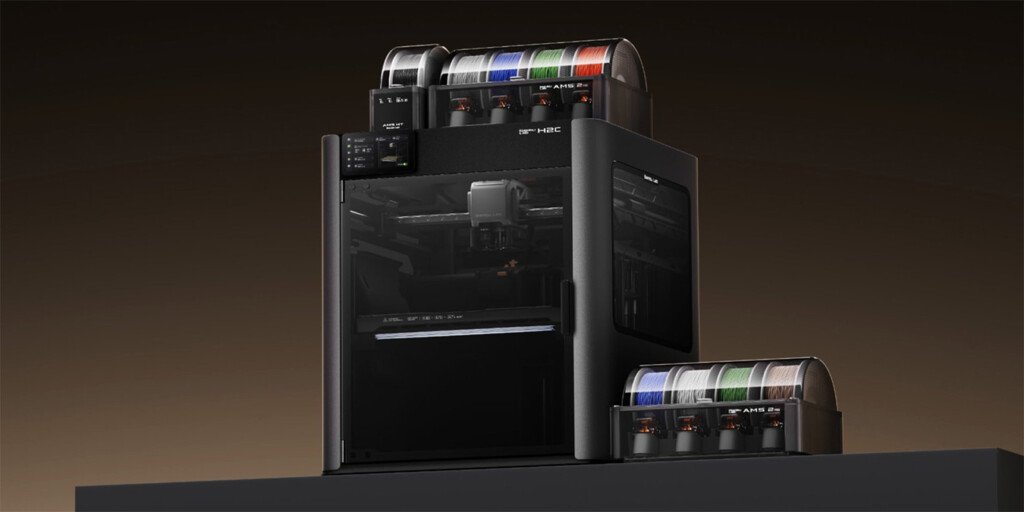

The Bambu Lab H2C is the kind of machine that makes you do a double-take—because it isn’t just “another fast CoreXY.” It’s Bambu trying to solve the messiest part of multicolor/multi-material printing: purge waste, time lost to swaps, and the general chaos of babysitting a complex setup.
This Bambu Lab H2C Review is a practical guide to what you’re actually buying. I’ll explain what the hotend-change approach does (and what it doesn’t), how the H2C fits into Bambu’s lineup, and who should spend this much on a printer in 2026.
If you want the short version: this H2C Review is about whether the “over-engineering” is worth it for your kind of printing.
Highlights
- Built for serious multi-material work with far less purge waste than typical multi-color setups
- Uses a hotend-change system intended to swap quickly (faster swaps than traditional multicolor routines)
- Large build volume class (around the 325 mm cube range depending on configuration/mode)
- High-temp capability: up to 350°C nozzle + actively heated chamber up to 65°C
- Very high rated motion system (real speed depends on filament, geometry, and quality targets)
- Multi-material scalability through an ecosystem designed for multiple filaments
- Not a “set it and forget it” budget printer—more systems means more maintenance mindset
- Premium pricing category and availability may vary by region
- Overkill if you print mostly single-color PLA
- Most compelling if you print multi-color/multi-material often and hate waste
Why You Should Trust Us
We evaluate printers using ownership criteria that matter after the honeymoon: reliability, material capability, workflow speed (not just peak mm/s), maintenance overhead, slicer usability, and whether the machine actually saves time and waste on real projects.
Table of Contents
- About Bambu Lab
- Bambu Lab H2C Review
- What the Hotend Changer Really Means
- Speed, Quality, and Real-World Use
- Materials and Engineering Printing
- Pros and Cons
- Who It’s Best For
- Who Should Skip It
- H2C Review: What Reviewers Highlight
- H2C vs Tool Changers and Other Bambu Options
- FAQs
- Final Verdict + Rating
About Bambu Lab
Bambu Lab built its reputation on fast, highly automated printers that feel more like appliances than tinkering projects. Their ecosystem is software-driven (slicer + app + filament system), and the big promise is repeatability: fewer failed prints, fewer calibration rituals, and a smoother path from model to finished part.
The H2C sits at the premium end of that philosophy—more automation, more throughput, and a bigger focus on multi-material efficiency than most hobby-first machines.
Testing criteria (what I evaluated)
- Workflow speed: time-to-finished-part, including swaps and “overhead time”
- Multi-material practicality: waste, consistency, and hands-off reliability
- Material capability: engineering filaments, filled materials, warping behavior
- Thermal environment: chamber heating, bed stability, and enclosure performance
- Quality at speed: surface finish, corners, bridges, small features
- Maintenance load: consumables, cleaning, downtime risk
- Value: whether it replaces multiple printers or truly saves money in waste
Quality & build
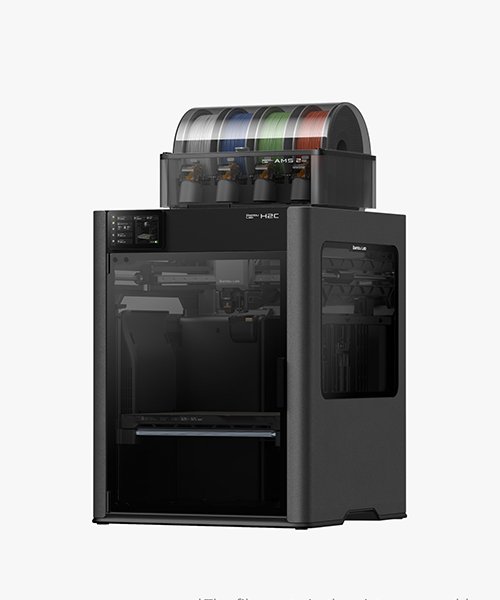
This is a heavy, industrial-feeling desktop machine—metal chassis, enclosed design, and a toolhead system designed around repeatability. It’s physically large and heavy, which matters for where you’ll place it and how you’ll service it.
You’re not buying a “cute desktop printer.” You’re buying a small manufacturing hub that expects a bit of seriousness from the owner.
Core specs that matter
Here are the specs buyers actually feel day-to-day:
- Build volume: varies by mode; commonly discussed in the ~325×320×320 mm class depending on configuration
- Nozzle temp: up to 350°C
- Heated bed: up to 120°C
- Active heated chamber: up to 65°C (big deal for warp-prone materials)
- Rated speed/accel: extremely high on paper; real results depend on print settings
- Material scope: broad, including common plastics and higher-temp engineering materials
What the hotend changer really means
Most multi-color printers rely on purging: you swap filament through the same nozzle and push out old color until the new color is clean. That creates purge waste, purge blocks/towers, and extra time.
The H2C’s key idea is swapping hotends rather than constantly flushing one nozzle. When executed well, that can reduce both waste and time on multi-color/multi-material jobs—especially compared to older single-nozzle multi-color workflows.
Important reality check: it’s not always the same thing as a classic independent toolhead changer. It’s designed to reduce waste and swap overhead, but the “flexibility ceiling” can differ depending on your use case.
Speed, quality, and real-world use
Where the H2C can feel “unfair” (in a good way):
- Multi-color models: less waste, fewer hours burned on purging, and faster completion
- Batch production: large volume + automation makes small production runs realistic
- Engineering parts: heated chamber + high nozzle temp is exactly what you want for tougher materials
Where it can surprise people:
- Complexity: a more advanced hotend system can mean more to maintain and keep aligned
- Diminishing returns for simple prints: if you mostly print single-color PLA, you may not unlock why the H2C exists
Ease of use
Bambu’s advantage is “less tinkering.” The H2C keeps that vibe in software and UI, but the machine is inherently more advanced. The experience is:
- Easy to start printing (Bambu-style workflow)
- More to learn if you want to exploit what makes H2C special (swap strategy, material planning, minimizing waste, keeping consumables healthy)
Maintenance / care
If you treat it like a small production device, you’ll be happy. That means:
- Keep a routine for hotend cleanliness
- Expect consumables (nozzles, wipers, filters) to be part of ownership
- Keep the enclosure and filtration maintained, especially with ABS/ASA and other fume-prone materials
Budget time for periodic checks so the “automation” stays reliable
Pros and Cons
Pros
- Major multi-color efficiency gains vs traditional purge-heavy workflows
- Large build volume for bigger parts or more parts per plate
- Serious material capability: high nozzle temp + heated chamber
- Rated for very high speed and strong automation workflow
- Best-in-class appeal for multi-material power users who print often
Cons
- Premium price category and not aimed at casual users
- Not identical to a classic tool changer in flexibility (depends on your definition and workflow)
- More mechanical/system complexity means higher maintenance expectations
- Overkill if you rarely print multi-color or engineering materials
- Availability/region considerations can be a factor
Who It’s Best For
The H2C is a strong fit if you are:
- Running a small shop, studio, or product lab and need efficient multi-material output
- Printing multi-color parts often and tired of purge waste
- Doing engineering materials where chamber heat and high nozzle temps matter
- The kind of user who values throughput and repeatability more than low cost
Who Should Skip It
Skip (or pause) if:
- You print mostly single-color PLA and don’t mind basic swaps
- You want a budget-friendly first printer
- You don’t want a more complex machine with a more complex maintenance reality
- You only need a small build volume and prefer something simpler
H2C Review: What Reviewers Highlight
The same points tend to repeat in coverage:
- The hotend-change approach is aimed at reducing waste and time on multicolor printing
- It can be dramatically faster on complex multi-color jobs than purge-heavy systems
- It’s polished and streamlined by Bambu standards, but still a complex machine under the hood
That’s the H2C in one sentence: big workflow upside, paid for with money and complexity.
H2C vs Tool Changers and Other Bambu Options
Here’s the clean way to think about it:
- If you want the least waste and fastest multi-material workflow possible: compare H2C against true tool-changer competitors. H2C narrows the gap and may beat many options in day-to-day convenience, but the categories aren’t always identical depending on your workflow.
- If you want Bambu speed but don’t need advanced multi-material efficiency: other Bambu models can be a better value if you’re mostly single-color printing.
FAQs
Is this a Bambu Lab H2C Review for buyers, not just specs?
Yes—this Bambu Lab H2C Review focuses on workflow (waste, time, reliability), not just headline speed.
What makes the H2C different from typical multi-color printers?
It’s designed to reduce purge waste and speed up swaps by changing hotends instead of flushing multiple colors through one nozzle.
What materials can it print?
It’s positioned to handle common materials plus many higher-temp engineering plastics, and it’s especially relevant if you need enclosure heat for warp control.
Does it have a heated chamber?
Yes—active chamber heating is a big part of the “engineering materials” value story.
Is the H2C fast in real life?
It’s rated extremely fast, and the biggest real-world speed wins show up in multi-color/multi-material printing where older systems lose time to purging.
Is this also an H2C Review for hobby users?
It can be, but it’s a premium machine. If you won’t use multi-material benefits, the value story gets weaker.
Who should buy it first?
Studios, product teams, and advanced makers doing frequent multi-color/multi-material work and wanting less waste.
What’s the biggest downside?
Complexity and cost—this is not a “simple budget printer,” and the more advanced system can mean more maintenance responsibility.
Final Verdict + Rating
The H2C exists to solve a specific pain point: multi-color/multi-material printing that’s usually slow, wasteful, and annoying. Early hands-on coverage suggests it meaningfully reduces waste and can cut time on complex jobs—while keeping the workflow relatively streamlined.
If you’re a serious maker or small production shop, this Bambu Lab H2C Review lands as a strong recommendation because waste and time savings can pay you back in real workflow.
If you’re mostly printing single-color parts, the H2C will feel like a sports car in a school zone: impressive, but not necessary.
Rating: 9.0/10 for multi-material power users
Rating: 7.6/10 for mostly single-color hobby printing