


AI video tools are everywhere right now—but most creators aren’t looking for “cool demos.” They’re looking for something they can actually use in a workflow, safely, repeatedly, and without getting stuck in a confusing interface.
This Adobe Firefly AI Video Generation Review breaks down what Firefly’s video features are best at (and where they’re still catching up), how the credit system works in real life, and whether Adobe’s “creative suite” approach makes this a smarter choice than standalone generators.
If you’re deciding between quick ideation clips, social-ready content, or production-friendly B-roll, this review will help you set realistic expectations—and get better results faster.
Highlights
- Best for: Creators and teams who already live in Adobe workflows and want commercially safer AI video outputs
- Two main modes: Adobe Firefly text to video and Adobe Firefly image to video (both designed for fast clip generation)
- Strongest use case: Concepting, pitch visuals, B-roll generation, and filling small gaps in creative projects
- Big differentiator: Creative controls and ecosystem alignment (Firefly + Creative Cloud tools)
- Plans are structured: Firefly Standard, Pro, Premium, plus Creative Cloud Pro as an all-apps option
- Credit-based usage: Premium video features rely on generative credits, so heavy users should plan accordingly
- Learning curve: Low—Firefly is one of the more approachable video generators for non-technical users
- Quality reality check: Excellent for ideation and short clips; not a full replacement for a human editor or a full production pipeline
- Most common pain point: Credits/limits and the need to iterate prompts to dial in motion consistency
- Best “quick win”: Start from a still image and animate it—often easier to steer than pure text prompts
Why You Should Trust Us
We review creative AI tools using consistent criteria: output quality, controllability, workflow fit, reliability, and real-world usability (not just “wow factor”). We also evaluate who the tool is best for—because the best AI video generator depends on your goals, timelines, and tolerance for iteration.
Table of Contents
- About Adobe Firefly
- Adobe Firefly AI Video Generation Review
- Best-Selling Products from Adobe (5 Official Picks)
- Adobe Firefly AI Video Generation Reviews: What Do Customers Think?
- Is Adobe Firefly Legit?
- Is Adobe Firefly AI Video Generation Worth It?
- Adobe Firefly text to video
- Adobe Firefly image to video
- Adobe Firefly AI Video Generation vs Runway
- Discounts and Promotions
- Where Can I Buy Adobe Firefly?
- FAQs
- Similar Brands You Might Like
- Final Verdict + Rating
About Adobe Firefly
Adobe Firefly is Adobe’s generative AI platform designed for creators who want fast ideation and production-friendly outputs across images, video, audio, and design assets.
Brand background
Firefly sits inside the Adobe ecosystem and is positioned as an AI “creative space,” not just a standalone generator. That matters because many people who use Firefly are already editing in Adobe tools and want an AI video generator that fits their workflow.
What they’re known for
- Creator-first UX: straightforward interface and clear generation modes
- Commercially safer positioning: strong emphasis on responsible training sources and usage suitability for creative projects
- Workflow integration: Firefly outputs are designed to pair naturally with Adobe creative apps
Who they’re for
Firefly is for creators, marketers, designers, and editors who want AI-generated clips and assets they can actually use in brand work, content creation, and pitch decks—without spending hours learning a new toolchain.
Adobe Firefly AI Video Generation Review
Here’s the testing framework used for this Adobe Firefly AI Video Generation Review:
Testing criteria (what we evaluated):
- Output quality: realism, motion coherence, artifacts, and style consistency
- Control: prompt sensitivity, camera control options, and ability to steer results
- Reliability: generation success rates, time-to-output, and repeatability
- Workflow fit: how easily outputs move into real projects (editing, social, pitch decks)
- Value: credit usage, plan tiers, and whether heavy users can scale without pain
Quality & Build / Materials
For an AI tool, “build quality” shows up as interface polish, stability, and how often the tool produces usable outputs instead of “almost good” outputs.
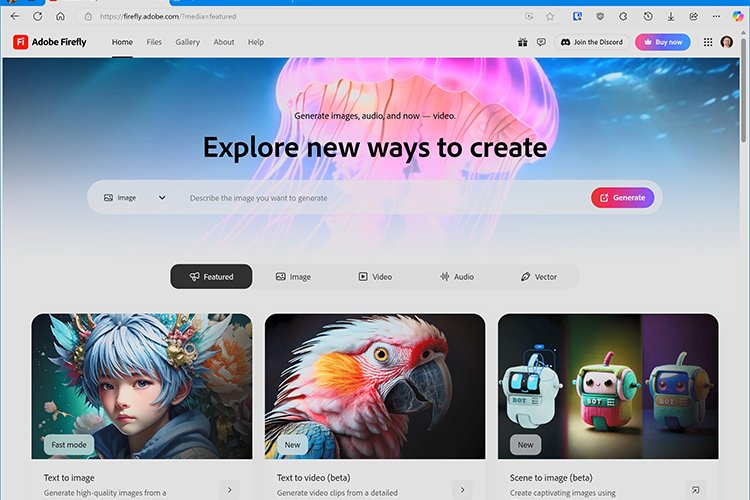
Firefly’s video generation feels intentionally designed for creators who need quick, usable clips—not a research sandbox. The interface is clean, and the generation modes are framed in plain language, which is a big plus if you’re not a technical user.
Key Features
At a high level, Adobe Firefly’s video generation revolves around:
- Text to video: generate a clip from a detailed prompt (scene, mood, style, camera direction)
- Image to video: animate a still image into a short, moving clip
- Creative controls: options that help guide style and motion without overwhelming beginners
- Commercially safer stance: positioned for creators working on brand and client content
- Generative credits system: premium video creation uses credits, which affects how “all day” you can use it
Performance / Real-World Use
In practical work, AI video is less about “one perfect generation” and more about getting a workable clip within a few tries.
Firefly performs best when you use it like a creative assistant:
- Idea exploration: generate 5–10 variations to land on a direction
- B-roll stand-ins: quick inserts to support a story beat
- Pitch visuals: concepts that communicate tone and scene design fast
- Social snippets: short clips where vibe matters more than cinematic perfection
Where expectations need to be realistic:
- Motion can drift across frames if prompts are vague
- Hands, text, and fine details can still look uncanny in some outputs
- You’ll likely do light cleanup in an editor if it’s going into client work
Ease of Use
Firefly is one of the easier AI video tools to start with because it’s built around simple choices:
- Choose your mode (text or image)
- Add a prompt or image
- Generate
- Iterate
If you’ve ever felt overwhelmed by AI video tools that bury you in settings, Firefly’s simplicity is a major strength.
Maintenance / Care
AI video “maintenance” mostly means:
- understanding how credits work
- saving successful prompts (and reusing prompt structures)
- building a mini prompt library for your brand or style
If you use Firefly weekly, your biggest improvement will come from creating a repeatable prompt template (scene + subject + action + camera + lighting + mood + style).
What I Like
- Creator-friendly interface: easy to start, easy to iterate
- Two strong core modes: Adobe Firefly text to video + Adobe Firefly image to video cover most creator needs
- Workflow alignment: makes sense for people already editing in creative tools
- Great for ideation: fast variations help you find a visual direction quickly
- Brand-focused usability: positioning is better suited for commercial work than many “anything goes” generators
What I Don’t Like
- Credits can create friction if you’re experimenting heavily
- Prompt iteration is mandatory: you won’t nail it in one pass most of the time
- Not a full production substitute: longer narrative scenes and complex continuity are still challenging
- Some outputs need polish before they’re truly “final” for professional use
Price & Value
Adobe offers multiple ways to access premium AI video generation, and value depends on how often you generate video clips.
In general:
- If you generate occasionally, a lighter plan can be enough.
- If you generate daily (especially for client content), you’ll want higher monthly credit capacity.
- If you already subscribe to Adobe’s broader creative plan, it may be more efficient than buying a standalone AI video tool plus separate editing software.
Best-Selling Products from Adobe (5 Official Picks)
Adobe doesn’t present “best sellers” in a typical ecommerce way for Firefly video, but the official plan pages and credit documentation make it clear which offerings are most central to Firefly video generation. Here are five of the most prominent, actively marketed options on Adobe’s official site:
Who it’s best for: Beginners who want to test the tool and understand the workflow before paying.
Top 3 key features:
- Lets you try Firefly and explore basic generation capabilities
- Limited complimentary generations for premium features (varies over time)
- Great for learning prompt structure without commitment
One honest drawback: You’ll quickly hit limits if you’re generating video regularly.
Mini verdict: Best as a trial run—use it to learn the tool, then upgrade if you like the workflow.
Who it’s best for: Casual creators who generate AI video occasionally and want predictable monthly access.
Top 3 key features:
- Monthly generative credits included (entry-level tier)
- Access to premium generative features like video generation via credits
- Good for light social content, ideation, and small projects
One honest drawback: Frequent iteration can burn through credits faster than you expect.
Mini verdict: A practical starter plan if you create AI video a few times a week.
Who it’s best for: Consistent creators who generate video weekly and need more room for iteration.
Top 3 key features:
- Higher monthly credit capacity than Standard
- Better fit for content creators, marketers, and small teams
- Designed for regular use across image/video/audio generation
One honest drawback: Still credit-based, so “all day” heavy generation may require Premium or add-ons.
Mini verdict: The sweet spot for most serious creators who want steady output.
Who it’s best for: High-volume creators or teams generating AI video at scale.
Top 3 key features:
- Highest credit capacity in the Firefly plan lineup
- Best for frequent video generation and large iteration cycles
- Built for sustained use without constantly watching your remaining credits
One honest drawback: Overkill if you only generate video occasionally.
Mini verdict: The best option if Firefly is a core production tool, not a side experiment.
Who it’s best for: Creators who want Firefly + a full creative suite for editing, design, and delivery.
Top 3 key features:
- Bundles a broad set of creative apps with generative AI access
- Strong value for people who already need professional editing tools
- Better “one subscription” workflow for creation + finishing
One honest drawback: If you only want AI video (and don’t need creative apps), it may be more than you need.
Mini verdict: The most efficient choice for serious creatives who also need pro editing tools.
Adobe Firefly AI Video Generation Reviews: What Do Customers Think?
Across creator communities and general user feedback, sentiment around Firefly video generation tends to be consistent:
Common themes
- Ease of use: Many users like that it’s approachable and not overly technical
- Workflow fit: People who already use Adobe tools appreciate staying in one ecosystem
- Output quality: Strong for short clips, concept visuals, and B-roll-style inserts
- Iteration reality: Users report needing multiple tries to get motion and style “just right”
- Credits/limits: A frequent discussion point—especially for heavy experimentation
Customer sentiment examples (paraphrased)
- “It’s the easiest AI video tool I’ve tried—fast to get something usable.”
- “I like it for pitch decks and quick social concepts, not for full narrative scenes.”
- “Image-to-video gives me better control than text prompts alone.”
- “Credits make me plan my experiments more carefully.”
- “Great for generating B-roll when I can’t shoot what I need.”
Is Adobe Firefly Legit?
Yes. Adobe is an established creative software company, and Firefly is a core part of its product strategy. In practical terms, that means:
- a clear product roadmap
- ongoing support and documentation
- a platform designed for creators who need repeatable, usable outputs
Is Adobe Firefly AI Video Generation Worth It?
It’s worth it if:
- you want AI video generation that’s easy to use and designed for creative workflows
- you already rely on creative editing tools and want an AI generator that fits in
- you need quick concept clips, social assets, pitch visuals, or B-roll-style inserts
- you value a commercially safer approach for brand work
It may not be worth it if:
- you want long-form video generation with strong continuity across scenes
- you need maximum technical controls and experimental features
- you want unlimited generation without thinking about credits (most tools still have limits—just different ones)
Adobe Firefly text to video
Adobe Firefly text to video is best when you treat prompts like a creative brief—not a one-liner.
A prompt that performs well usually includes:
- Subject (who/what)
- Action (what’s happening)
- Setting (where)
- Style (cinematic, documentary, animation, etc.)
- Camera direction (close-up, wide shot, tracking shot, slow push-in)
- Lighting/mood (golden hour, moody neon, soft studio light)
Tips that improve results:
- Write prompts like a storyboard note
- Keep the scene simple (one clear subject, one clear action)
- If motion is weird, reduce complexity and try again
- Save your “winning” prompt structures and reuse them
When Adobe Firefly text to video shines:
- fast moodboarding
- short cinematic inserts
- product concept visuals
- social clip ideation
Where it’s more challenging:
- multi-character action
- precise choreography
- consistent faces across many iterations (still improving across the industry)
Adobe Firefly image to video
If you want more control, Adobe Firefly image to video is often the better starting point.
Why it works:
- You’re anchoring the model to a specific composition
- The tool can focus on animating movement and atmosphere
- It reduces randomness compared to pure text generation
Best ways to use it:
- Animate a product shot for a quick ad concept
- Bring concept art to life (subtle camera moves, parallax, ambient motion)
- Turn a key frame into a short moving clip for a pitch or storyboard
- Create social-friendly “motion posters” and loops
Tips for better Adobe Firefly image to video results:
- Use a clean, high-contrast image with a clear subject
- Decide your motion goal first (camera push-in, pan, drift, zoom, or subject movement)
- Keep the prompt focused on movement and vibe rather than rewriting the entire scene
- Try subtle motion first—big movements are harder to keep coherent
If you’re new to Firefly video, Adobe Firefly image to video is the mode most likely to make you say, “Okay—this is actually useful.”
Adobe Firefly AI Video Generation vs Runway
Runway is one of the biggest names in AI video generation, so this is a common comparison.
Category | Adobe Firefly AI Video Generation | Runway | Who wins |
Ease of use | Beginner-friendly, clean UI | Powerful, can feel more “tool-heavy” | Firefly (for beginners) |
Workflow fit | Strong for Adobe-centric creators | Strong for standalone experimentation | Depends |
Commercial comfort | Strong emphasis on brand-safe use | Varies by model and workflow | Firefly (for many teams) |
Creative controls | Solid, creator-oriented | Often deeper/experimental | Runway (for power users) |
Best for | Brands, marketers, Adobe users | Experimental creators, advanced workflows | Depends |
My take: If you want something that feels built for real creative workflows and brand usage, Firefly is a strong pick. If you want maximum experimental power and don’t mind a more technical experience, Runway can be compelling.
Discounts and Promotions
Adobe often runs limited-time promotions on creative plans and sometimes includes special access windows (like temporary “generate without limits” periods) depending on the plan tier. If you’re price-sensitive, it’s worth timing your subscription around seasonal promos rather than paying full price on day one.
Where Can I Buy Adobe Firefly?
Adobe Firefly is available through Adobe’s official site as part of:
- Firefly plan tiers (Free, Standard, Pro, Premium)
- broader Creative Cloud plan options (like Creative Cloud Pro)
If you’re choosing where to start:
- Start with Free if you want to learn the workflow
- Move to Pro if you’re generating regularly and want room to iterate
- Consider Creative Cloud Pro if you also need professional editing tools
FAQs
1) What is Adobe Firefly AI Video Generation?
It’s Adobe’s AI video creation capability that generates short video clips from text prompts or still images inside the Firefly platform.
2) Are Adobe Firefly AI Video Generation Reviews generally positive?
Most Adobe Firefly AI Video Generation Reviews highlight ease of use and workflow fit, with the biggest debates focusing on credit limits and iteration needs.
3) How does Adobe Firefly text to video work?
You write a prompt describing the scene (subject, action, setting, style, and camera direction), then generate and iterate until you get a usable clip.
4) How does Adobe Firefly image to video work?
You upload an image as a starting frame, then use prompts to guide motion and style as the tool animates the still into a short clip.
5) Which is better: Adobe Firefly text to video or Adobe Firefly image to video?
For beginners and better control, Adobe Firefly image to video often wins. For quick ideation from scratch, Adobe Firefly text to video is great—especially with detailed prompts.
6) Is Firefly video generation free?
There’s a free tier, but premium video generation uses credits and may require a paid plan depending on how much you generate.
7) What’s the best way to get higher-quality outputs?
Use longer, more specific prompts, start with simpler scenes, and iterate in small changes. Also try image-to-video for more control.
8) Can I use Firefly-generated videos commercially?
Adobe positions Firefly for creator and brand workflows, but usage eligibility can vary by feature status and model. Always follow the usage terms associated with your generation mode.
9) How many clips can I make per month?
That depends on your plan tier and monthly credit allocation. Heavy iteration will require a higher tier or add-on credits.
10) Who should avoid Firefly video generation?
If you need long-form continuity, precise multi-scene storytelling, or ultra-advanced experimental controls, you may prefer a more specialized generator.
Similar Brands You Might Like
If Firefly isn’t the right fit, consider:
- Runway (powerful, experimental video workflows)
- Pika (fast social-style generation)
- Luma (strong motion aesthetics in certain styles)
- OpenAI Sora (when available for your use case and access level)
Final Verdict + Rating (1–10)
In 2026, Firefly’s video generation feels less like a gimmick and more like a practical creator tool—especially for people who want quick, usable clips and an interface that doesn’t fight them. The best results come when you treat prompts like mini creative briefs and lean on Adobe Firefly image to video for more control.
If your goal is rapid ideation, brand-friendly short clips, and an AI video generator that fits into creative workflows, this is a strong contender.
Rating: 8.4 / 10